Note ABA2.1.2
Publisher Description


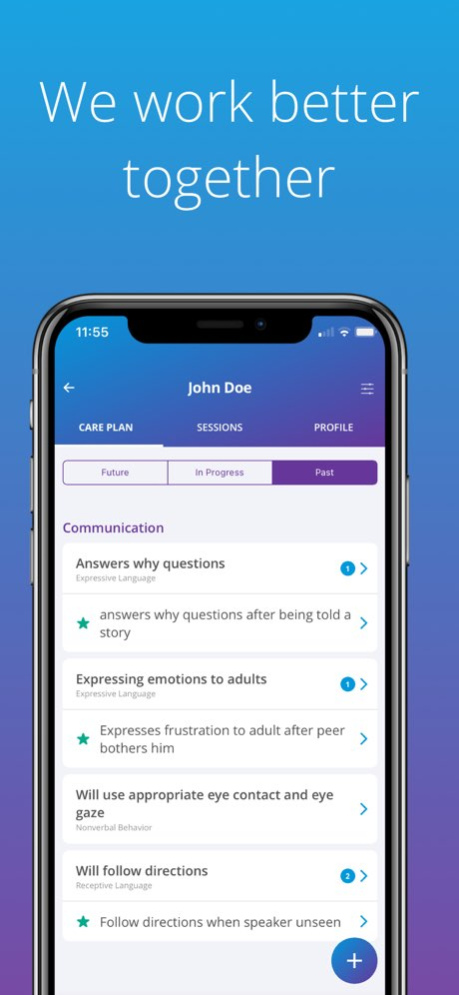
HIPAA-compliant mobile solution for ABA practitioners on the field. Configure care plans, manage scheduling, capture and analyze session data in one seamless interface.
As an ABA professional your work is mobile by nature, but your desktop computer is not. Note for ABA addresses the need for mobility, offline capabilities, simplicity, and ease-of-use. Setting itself apart from other digital tools for ABA, Note draws upon human interaction developed through day-to-day use of common mobile apps. Clinical, operational, and technical complexity at the core of all app functionality is masked in a delightful intuitive experience for BCBAs and BTs.
Scheduling
. Manage scheduling with your clients with a guided scheduling experience that ensures all hours worked will be reimbursable.
. Flexibility to edit schedule within payor and practice guidelines.
. Sessions are validated against practice database
. Day/Week/Month views with filtering capabilities
. Color-coded statuses for easy scanning
On-the-Go Care Planning
. Predefined domains and subdomains ensure consistency across clients and ensures alignment with core deficits of Autism
. Future view for planning in advance
. In Progress view of all open goals, targets, and behaviors
. Past view shows client’s progress over time
Curriculum Library
. Easily put together a curriculum from predefined ready-to-use goals and targets commonly found in the ASD curriculum
. Curriculum based on high clinical standards and fully customizable for your own use
Data Collection
. Data can be collected directly from within scheduled session.
. Collect data on multiple targets simultaneously or on individual targets
. Scores calculated in real time once expected trials are met for a target
. Target teaching instructions and behavior intervention plans easily accessible during data collection.
Data Analysis
. Target graphs followed by detailed target history
. Automatic and manual phase changes help visualize trends
. Target configuration can be viewed along with graph
Care Team Management
. View of entire care team schedule with filtering by provider for easy supervision scheduling and care team management
. Data collection and documentation within every session of care team members
. Target assignment for each target in the care plan gives the BCBA precise control over which BT can address that target in sessions. This allows the BCBA to ensure that only trained practitioners implement interventions and allows for balanced distribution of the care plan between care team members
Version History Enhancements 2.1.2 Jun 16 Enhancements 2.1.1 Jun 9 Global Condition Change Lines
Collect Zero on a Skill Acquisition Count Target within a session
New Phase: Generalization
Session location visibility enhancements. 2.1.0 May 18 Enhancements 2.0.11 Apr 16 Enhancements 2.0.10 Apr 15 Enhancements 2.0.9 Apr 5 Enhancements 2.0.8 Mar 19 Enhancements 2.0.5 Feb 19 Enhancements 2.0.4 Feb 6 Bug fixes 2.0.3 Feb 2 You can now set up a Prompting Workflow on percent correct targets! Prompting Workflows help behavior analysts best support the learner towards independence by guiding how and when the behavior technician should prompt the learner, and how prompting should be faded.
This release includes a major framework upgrade—share your feedback to help us keep rolling out enhancements.
Change a target’s phase with fewer clicks! Simply click the 3 dots menu at the top right of the target details page, click change phase, and choose the new phase.
Manual data points added for duration targets or behaviors are saved and plotted on the graph properly.
Data shows on graph even if the provider who collected the data is no longer assigned to the learner.
Errors adding data to a graph on the day a target was created have been eliminated. 2.0.2 Jan 29 Enhancements 1.4.35 04/16/2025 Enhancements 1.4.33 04/10/2025 Interactive Activity Report: Open targets directly from the activity report to make the relevant updates.
Geolocation Tracking for All Service Types: If your organization requires EVV (electronic visit verification), exact timing and geolocation will be tracked when “Start/End Session” is pressed in Note. You’ll be asked if the app can access your exact location if your organization’s policy requires it.
Faster session status refreshes and login speed. 1.4.31 04/07/2025 Faster login and session submission speed!
Assessment report enhancements- centered graphs and reduced errors generating reports
Sessions cannot be submitted before end time of session 1.4.25 03/06/2025 Session submission enhancements 1.4.21 01/15/2025 • Schedule with ease by reviewing how many hours you've utilized for a service and how many hours remaining!
• Major enhancements on data collection speed and performance
• Optimized session submission loading time 1.4.20 12/19/2024 Intervention techniques are required to be configured to activate a target.
Intervention techniques can be configured on duration targets.
Scenarios where session note templates do not load are eliminated. 1.4.17 11/26/2024 Sync and performance enhancements
Scenarios where session note templates or care plans did not load have been eliminated. 1.4.16 11/20/2024 SD can be configured on task analysis targets. The SD will show for the behavior technician before the first step of each trial. 1.4.14 09/19/2024 Clone Targets! Open any target and press the menu icon at the top right to choose how many times you’d like to clone the target. Targets will be cloned with all configurations and parented under the same domain, subdomain, and goal.
Export graphs, paper data, and assessment reports from a learner’s care plan! Click the menu icon at the top right of a learner’s care plan to access their related exports.
Additional sync errors eliminated. 1.4.12 09/13/2024 Patient information is automated into the assessment report.
Sessions that were validated refresh on the sessions list without a manual sync. 1.4.11 09/04/2024 Phase Change Lines- Whenever the phase (previously called “status”) of a target is updated, a solid vertical line is plotted on the graph on that date.
Edit a Phase Change date by selecting the phase change from the target history and adjusting the date.
Fixes:
Baseline data can be added to behavior objectives.
When configuring task analysis targets, the Add Steps page scrolls properly, allowing more than 15 steps can be configured.
Eliminated scenarios where scores that met the minimum trials criteria were not plotting on the graph.
Reduced freezing during data collection. 1.4.8 07/23/2024 Improved login experience with faster speeds and fewer errors.
Task Analysis scores show properly on target history.
Scores calculate after expected trials are met instead of minimum trials on the target list during data collection. 1.4.7 07/02/2024 Trial count on percent correct and task analysis targets shows out of expected trials (rather than minimum trials) during data collection.
Undo button undoes one trial at a time.
More than one trial can be collected when entering data after a session.
Eliminated scenarios where sessions could not be ended.
Additional sync errors resolved
Additional validation measures to ensure sessions can only be submitted when they have passed validation based on most recent updates from your organization. Sign & Submit button is now an online-only feature. Connect to a network to submit your sessions. 1.4.6 06/02/2024
About Note ABA
The company that develops Note ABA is Chorus Software Solutions LLC. The latest version released by its developer is 2.1.2.
To install Note ABA on your iOS device, just click the green Continue To App button above to start the installation process. The app is listed on our website since 2026-10-13 and was downloaded 2 times. We have already checked if the download link is safe, however for your own protection we recommend that you scan the downloaded app with your antivirus. Your antivirus may detect the Note ABA as malware if the download link is broken.
How to install Note ABA on your iOS device:
- Click on the Continue To App button on our website. This will redirect you to the App Store.
- Once the Note ABA is shown in the iTunes listing of your iOS device, you can start its download and installation. Tap on the GET button to the right of the app to start downloading it.
- If you are not logged-in the iOS appstore app, you'll be prompted for your your Apple ID and/or password.
- After Note ABA is downloaded, you'll see an INSTALL button to the right. Tap on it to start the actual installation of the iOS app.
- Once installation is finished you can tap on the OPEN button to start it. Its icon will also be added to your device home screen.
Program Details
System requirements
Download information
Pricing
Version History
version 2.1.2
posted on 2026-10-13
Version History Enhancements 2.1.2 Jun 16 Enhancements 2.1.1 Jun 9 Global Condition Change Lines
Collect Zero on a Skill Acquisition Count Target within a session
New Phase: Generalization
Session location visibility enhancements. 2.1.0 May 18 Enhancements 2.0.11 Apr 16 Enhancements 2.0.10 Apr 15 Enhancements 2.0.9 Apr 5 Enhancements 2.0.8 Mar 19 Enhancements 2.0.5 Feb 19 Enhancements 2.0.4 Feb 6 Bug fixes 2.0.3 Feb 2 You can now set up a Prompting Workflow on percent correct targets! Prompting Workflows help behavior analysts best support the learner towards independence by guiding how and when the behavior technician should prompt the learner, and how prompting should be faded.
This release includes a major framework upgrade—share your feedback to help us keep rolling out enhancements.
Change a target’s phase with fewer clicks! Simply click the 3 dots menu at the top right of the target details page, click change phase, and choose the new phase.
Manual data points added for duration targets or behaviors are saved and plotted on the graph properly.
Data shows on graph even if the provider who collected the data is no longer assigned to the learner.
Errors adding data to a graph on the day a target was created have been eliminated. 2.0.2 Jan 29 Enhancements 1.4.35 04/16/2025 Enhancements 1.4.33 04/10/2025 Interactive Activity Report: Open targets directly from the activity report to make the relevant updates.
Geolocation Tracking for All Service Types: If your organization requires EVV (electronic visit verification), exact timing and geolocation will be tracked when “Start/End Session” is pressed in Note. You’ll be asked if the app can access your exact location if your organization’s policy requires it.
Faster session status refreshes and login speed. 1.4.31 04/07/2025 Faster login and session submission speed!
Assessment report enhancements- centered graphs and reduced errors generating reports
Sessions cannot be submitted before end time of session 1.4.25 03/06/2025 Session submission enhancements 1.4.21 01/15/2025 • Schedule with ease by reviewing how many hours you've utilized for a service and how many hours remaining!
• Major enhancements on data collection speed and performance
• Optimized session submission loading time 1.4.20 12/19/2024 Intervention techniques are required to be configured to activate a target.
Intervention techniques can be configured on duration targets.
Scenarios where session note templates do not load are eliminated. 1.4.17 11/26/2024 Sync and performance enhancements
Scenarios where session note templates or care plans did not load have been eliminated. 1.4.16 11/20/2024 SD can be configured on task analysis targets. The SD will show for the behavior technician before the first step of each trial. 1.4.14 09/19/2024 Clone Targets! Open any target and press the menu icon at the top right to choose how many times you’d like to clone the target. Targets will be cloned with all configurations and parented under the same domain, subdomain, and goal.
Export graphs, paper data, and assessment reports from a learner’s care plan! Click the menu icon at the top right of a learner’s care plan to access their related exports.
Additional sync errors eliminated. 1.4.12 09/13/2024 Patient information is automated into the assessment report.
Sessions that were validated refresh on the sessions list without a manual sync. 1.4.11 09/04/2024 Phase Change Lines- Whenever the phase (previously called “status”) of a target is updated, a solid vertical line is plotted on the graph on that date.
Edit a Phase Change date by selecting the phase change from the target history and adjusting the date.
Fixes:
Baseline data can be added to behavior objectives.
When configuring task analysis targets, the Add Steps page scrolls properly, allowing more than 15 steps can be configured.
Eliminated scenarios where scores that met the minimum trials criteria were not plotting on the graph.
Reduced freezing during data collection. 1.4.8 07/23/2024 Improved login experience with faster speeds and fewer errors.
Task Analysis scores show properly on target history.
Scores calculate after expected trials are met instead of minimum trials on the target list during data collection. 1.4.7 07/02/2024 Trial count on percent correct and task analysis targets shows out of expected trials (rather than minimum trials) during data collection.
Undo button undoes one trial at a time.
More than one trial can be collected when entering data after a session.
Eliminated scenarios where sessions could not be ended.
Additional sync errors resolved
Additional validation measures to ensure sessions can only be submitted when they have passed validation based on most recent updates from your organization. Sign & Submit button is now an online-only feature. Connect to a network to submit your sessions. 1.4.6 06/02/2024
version 2.1.0
posted on 2026-06-03
Version History Global Condition Change Lines
Collect Zero on a Skill Acquisition Count Target within a session
New Phase: Generalization
Session location visibility enhancements. 2.1.0 May 18 Enhancements 2.0.11 Apr 16 Enhancements 2.0.10 Apr 15 Enhancements 2.0.9 Apr 5 Enhancements 2.0.8 Mar 19 Enhancements 2.0.5 Feb 19 Enhancements 2.0.4 Feb 6 Bug fixes 2.0.3 Feb 2 You can now set up a Prompting Workflow on percent correct targets! Prompting Workflows help behavior analysts best support the learner towards independence by guiding how and when the behavior technician should prompt the learner, and how prompting should be faded.
This release includes a major framework upgrade—share your feedback to help us keep rolling out enhancements.
Change a target’s phase with fewer clicks! Simply click the 3 dots menu at the top right of the target details page, click change phase, and choose the new phase.
Manual data points added for duration targets or behaviors are saved and plotted on the graph properly.
Data shows on graph even if the provider who collected the data is no longer assigned to the learner.
Errors adding data to a graph on the day a target was created have been eliminated. 2.0.2 Jan 29 Enhancements 1.4.35 04/16/2025 Enhancements 1.4.33 04/10/2025 Interactive Activity Report: Open targets directly from the activity report to make the relevant updates.
Geolocation Tracking for All Service Types: If your organization requires EVV (electronic visit verification), exact timing and geolocation will be tracked when “Start/End Session” is pressed in Note. You’ll be asked if the app can access your exact location if your organization’s policy requires it.
Faster session status refreshes and login speed. 1.4.31 04/07/2025 Faster login and session submission speed!
Assessment report enhancements- centered graphs and reduced errors generating reports
Sessions cannot be submitted before end time of session 1.4.25 03/06/2025 Session submission enhancements 1.4.21 01/15/2025 • Schedule with ease by reviewing how many hours you've utilized for a service and how many hours remaining!
• Major enhancements on data collection speed and performance
• Optimized session submission loading time 1.4.20 12/19/2024 Intervention techniques are required to be configured to activate a target.
Intervention techniques can be configured on duration targets.
Scenarios where session note templates do not load are eliminated. 1.4.17 11/26/2024 Sync and performance enhancements
Scenarios where session note templates or care plans did not load have been eliminated. 1.4.16 11/20/2024 SD can be configured on task analysis targets. The SD will show for the behavior technician before the first step of each trial. 1.4.14 09/19/2024 Clone Targets! Open any target and press the menu icon at the top right to choose how many times you’d like to clone the target. Targets will be cloned with all configurations and parented under the same domain, subdomain, and goal.
Export graphs, paper data, and assessment reports from a learner’s care plan! Click the menu icon at the top right of a learner’s care plan to access their related exports.
Additional sync errors eliminated. 1.4.12 09/13/2024 Patient information is automated into the assessment report.
Sessions that were validated refresh on the sessions list without a manual sync. 1.4.11 09/04/2024 Phase Change Lines- Whenever the phase (previously called “status”) of a target is updated, a solid vertical line is plotted on the graph on that date.
Edit a Phase Change date by selecting the phase change from the target history and adjusting the date.
Fixes:
Baseline data can be added to behavior objectives.
When configuring task analysis targets, the Add Steps page scrolls properly, allowing more than 15 steps can be configured.
Eliminated scenarios where scores that met the minimum trials criteria were not plotting on the graph.
Reduced freezing during data collection. 1.4.8 07/23/2024 Improved login experience with faster speeds and fewer errors.
Task Analysis scores show properly on target history.
Scores calculate after expected trials are met instead of minimum trials on the target list during data collection. 1.4.7 07/02/2024 Trial count on percent correct and task analysis targets shows out of expected trials (rather than minimum trials) during data collection.
Undo button undoes one trial at a time.
More than one trial can be collected when entering data after a session.
Eliminated scenarios where sessions could not be ended.
Additional sync errors resolved
Additional validation measures to ensure sessions can only be submitted when they have passed validation based on most recent updates from your organization. Sign & Submit button is now an online-only feature. Connect to a network to submit your sessions. 1.4.6 06/02/2024 Enhancements 1.4.4 05/20/2024 New forms of measure:
• Duration for skill acquisition targets
• Duration for behavior reduction objectives
• Rate for behavior reduction objectives
Improved data collection performance for Percent Correct targets 1.4.3 05/10/2024
version 2.0.8
posted on 2026-03-19
Enhancements
version 1.4.35
posted on 2025-04-16
Apr 16, 2025
Version 1.4.35
Enhancements
version 1.4.31
posted on 2025-04-07
Apr 7, 2025
Version 1.4.31
Interactive Activity Report: Open targets directly from the activity report to make the relevant updates.
Geolocation Tracking for All Service Types: If your organization requires EVV (electronic visit verification), exact timing and geolocation will be tracked when “Start/End Session” is pressed in Note. You’ll be asked if the app can access your exact location if your organization’s policy requires it.
Faster session status refreshes and login speed.
version 1.4.25
posted on 2025-03-06
Mar 6, 2025
Version 1.4.25
Faster login and session submission speed!
Assessment report enhancements- centered graphs and reduced errors generating reports
Sessions cannot be submitted before end time of session
version 1.4.21
posted on 2025-01-15
Jan 15, 2025
Version 1.4.21
Session submission enhancements
version 1.4.20
posted on 2024-12-19
Dec 19, 2024
Version 1.4.20
• Schedule with ease by reviewing how many hours you've utilized for a service and how many hours remaining!
• Major enhancements on data collection speed and performance
• Optimized session submission loading time
version 1.4.17
posted on 2024-11-26
Nov 26, 2024
Version 1.4.17
Intervention techniques are required to be configured to activate a target.
Intervention techniques can be configured on duration targets.
Scenarios where session note templates do not load are eliminated.
version 1.4.14
posted on 2024-09-19
Sep 19, 2024
Version 1.4.14
SD can be configured on task analysis targets. The SD will show for the behavior technician before the first step of each trial.
